Software FAQ
General Questions
How does your software integrate with SOLIDWORKS, Solid Edge and Autodesk Inventor?
GearTrax, GearTeq and CamTrax64
are add-ons for SOLIDWORKS, Solid Edge and Autodesk Inventor. This means that
they run in their own memory space and use the SOLIDWORKS, Solid Edge or
Autodesk Inventor API to construct the parts directly inside of SOLIDWORKS,
Solid Edge or Autodesk Inventor just as if you were drawing them.
I don’t own SOLIDWORKS, Solid Edge or Autodesk Inventor. Can I use GearTrax, GearTeq or CamTrax64 as a standalone program?
Yes. To run our software as a standalone program, download the SOLIDWORKS version of the software. When downloading, enter "standalone" for the SOLIDWORKS serial number. We will email you with instructions on how to create the serial number for your computer.
How does your software work as a standalone program?
GearTrax, GearTeq and CamTrax64 use CAD packages like SOLIDWORKS, Solid Edge and Autodesk Inventor to create 3D models. If you don’t own SOLIDWORKS, Solid Edge or Autodesk Inventor, you can use our software to produce basic DXF and XY files which can then be imported into other programs. Our software cannot export IGES or STEP files.
Does your software integrate with the SolidCAM OEM version of SOLIDWORKS?
We are not currently able to hook into the SolidCAM OEM version of SOLIDWORKS. We would need some information from SolidCAM to do that. We have tried to obtain this information in the past, but this has proved futile. We simply need to know the name of the application as boxed in red in the sample below:

Can I use your software with Autodesk Inventor LT?
No. Inventor LT does not allow add-ons. You will need a different version of Inventor to use our software as an Inventor add-on.
Which version of your software should I run?
For SOLIDWORKS and Solid Edge users, we advise having only the latest versions of our software installed. The latest versions have enhancements and fixes that the older versions do not have. The latest versions of our software will function with older versions of SOLIDWORKS of Solid Edge. Our software downloads tool (https://camnetics.com/pf.php) provides specific information about which versions of SOLIDWORKS and Solid Edge each version of our software is compatible with.
Autodesk Inventor users will need to run the version of GearTrax, GearTeq or CamTrax64 that matches their version of Autodesk Inventor (for example, run GearTrax 2018 with Inventor 2018).
Will older versions of
your software run with newer versions of SOLIDWORKS, Solid Edge or Autodesk
Inventor? (For example, will GearTrax 2019 run with SOLIDWORKS 2020?)
No. Changes in the SOLIDWORKS, Solid Edge and Autodesk Inventor APIs with each major release require a new build of our software. If you are on the Camnetics, Inc. support and maintenance plan, the upgrade is free of charge.
Will newer versions of your software run with older versions of SOLIDWORKS, Solid Edge or Autodesk Inventor? (For example, will GearTrax 2019 run with SolidWorks 2018?)
Yes, for SOLIDWORKS and Solid Edge. The latest versions of our software are
backwards compatible with older versions of SOLIDWORKS through at least 2006.
However, Autodesk Inventor users will need to run the version of GearTrax,
GearTeq or CamTrax64 that matches their version of Autodesk Inventor (for
example, run GearTrax 2018 with Inventor 2018).
Is your software
available in a language besides English?
Our software is only available in English but GearTrax (and GearTraxPRO) label items can be edited by the user to display in other languages. To program your own language, please do the following:
1.
In GearTrax or GearTraxPRO, choose General Options from the Spur/Helical
drop-down box or by clicking the General Options button on the menu bar.
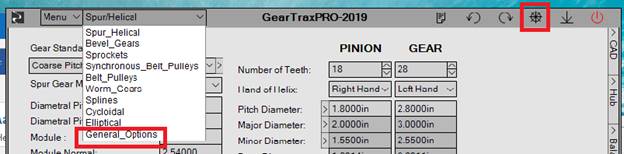
2. Choose the language you will be programming from the Language Selector drop-down box.
3. Check the Enable Label Edit box underneath the Language Selector drop-down box.
4. Hold down the control button on your computer keyboard while clicking on any label on the GearTraxPRO screen.
5.
Edit the label to whatever you would like it to read.
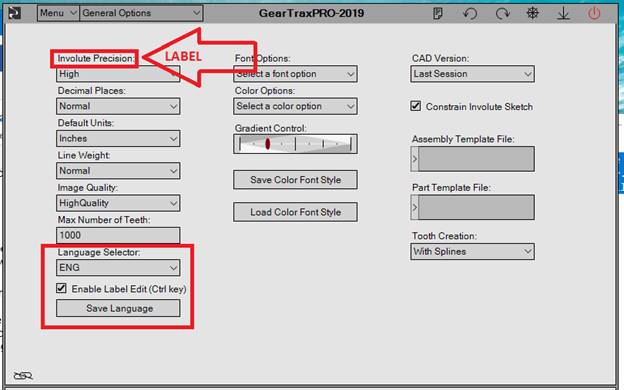
6. When you are done making changes, return to the General Options page and click Save Language.
Please share your language changes with Camnetics and other users. The files are located in C:\Users\[user name]\Documents\GearTrax\20xx\Languages\ folder. Please send edited language files to support@camnetics.com. Language files we receive from users will be reviewed and added to GearTrax for other users to access. Thank you!
To share privately the
language changes you’ve made with co-workers or other end users, send them the
edited language file and have them place it in
C:\Users\[user name]\Documents\GearTrax\20xx\Languages\ on their own computer.
They will need to replace the existing file of the same name with the shared
file.
Does your software
work with Win7?
Our software products may run on Win7, but we don't support it. Our 2017 products are not compatible with Win7.
Do you offer any
training?
No, we don’t. We strive to create software that is easy and intuitive to use. Manuals for our software are available via PDF in the Help menu of the software. Software demo and instructional videos can be found on our website's Media Page.
We also offer free technical support for prospective end users and those on the support and maintenance plan. Please send all technical questions and technical support requests to support@camnetics.com.
What is the Camnetics TruSpiral?
Please see http://camnetics.com/documents/truspiral.pdf
10 Day Trial Questions
How can I trial
GearTraxPRO?
Download and install GearTrax. After you enter your 10-day code and click the green button, you will be asked if you would like to trial GearTraxPRO.
Note: If you’re currently running a permanent GearTrax license, you will need to temporarily rename your GearTrax registration file (you can just add a 1 to the end) before entering the temporary code.
I installed a ten day trial version of your software, but when I enter the registration code you gave me, it says it is expired, or it says “invalid registration code for the serial number type”.
The 10-day trial starts the day the registration code is issued. If it’s been
more than ten days since we issued the trial code, please contact us. If it has
been less than ten days since your code was issued, please be sure to copy and
paste the registration code.
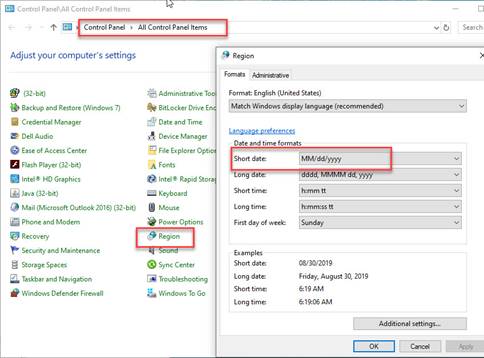
If the code still doesn’t work, you may need to go into the Windows Control Panel, Region and change the Short Date format for the duration of the trial period.
Purchasing Questions
How can I get a copy
of your current price list?
End users may contact us or your appropriate CAD reseller.
Resellers need to contact
us and we will email you a reseller price list. All resellers
are always required to use their company email address. Reseller requests
from Hotmail and Gmail type accounts will be ignored.
How do I purchase your
software?
Contact us or your CAD reseller.
If purchasing directly through us, purchase orders can be sent via email. After
we receive your order, an invoice with an online payment link will be emailed
to you. If you are located within the United States, payment may be made by
bank transfer (preferred), credit card or check. We do require payment in
advance for international orders via credit card or wire transfer.
I have a SOLIDWORKS network license. Can I purchase a single seat of your software or do I have to purchase a network license?
You can purchase a single seat of our software to be used on one computer. Generally,
our software uses the SOLIDWORKS serial number for registration. Since you are
using a SNL, our software will create a serial number on your computer that is
very similar to your SOLIDWORKS number. We will email you instructions for
creating this serial number.
I’m a student. Do you offer an educational version of your software?
Yes, we do. Single seat educational licenses are $95. A separate license must
be purchased for each type of software you wish to run (GearTrax, GearTeq or
CamTrax64). Support/maintenance is not available with the purchase of single
seat educational licenses.
We do offer educational network licenses as well. Contact us or your CAD reseller
for more information.
What does the
support/maintenance plan provide? If I don’t renew before my
support/maintenance expires will I still be able to run the software?
The support/ maintenance plan provides technical support for the software, via
email and phone, as well as software upgrades for the duration of the
support/maintenance plan.
If you don't renew, you will still be able to use the version of our software that corresponds with the year your support/maintenance expires. For example, if your GearTrax support/maintenance expired in 2018, the latest version of GearTrax you would be eligible to run is GearTrax 2018, but you will not be able to run any versions of our software newer than 2018.
If you upgrade to a version of SOLIDWORKS, Solid Edge or Autodesk Inventor newer than the version of our software that you are eligible to run (for example, you upgrade to SOLIDWORKS 2019, but your GearTrax support/maintenance expired in 2018), you will need to renew support/maintenance for our software to run it with the new version of SOLIDWORKS, Solid Edge or Autodesk Inventor.
Our Policy:
If the support and
maintenance package is purchased at a later date than the software or allowed
to expire, the charge to purchase/renew will be retroactive from the original
purchase date, or when the support and maintenance last expired, plus one year
forward. The maximum charge is equal to 3 years of support and maintenance. For
upgrade purposes, support and maintenance can be purchased within 5 years of
when the software was purchased or from when the support and maintenance last
expired.
Do you offer a network
license option?
Yes, we offer 2 types of network licenses for users running a SOLIDWORKS
Network License. For other users, we offer a Company Site License which will
allow you to run GearTrax, GearTeq or CamTrax64 on 5, 10, or 20 computers
simultaneously at a very reasonable price.
1. GearTrax/GearTeq/CamTrax64 SNL License - For end users with SOLIDWORKS network licenses only. The GearTrax, GearTeq and CamTrax64 SNL Licenses grant end users the right to use the licensed Camnetics, Inc. on all of their computers, simultaneously, that are running the SOLIDWORKS Network License. *One License, One Facility, Unlimited Users*
2. GearTrax/GearTeq/CamTrax64 SNL Global (10, 35, 75 or 125) License - For end users with SOLIDWORKS network licenses only. The GearTrax, GearTeq and CamTrax64 SNL Global (10, 35, 75 or 125) Licenses grant all the users of a single SOLIDWORKS Network License the right to use the licensed Camnetics, Inc. software on all of their computers at all of their facilities, simultaneously, that are running the SOLIDWORKS SNL. *One License, Multiple Facilities, Unlimited Users*
3. GearTrax, GearTraxPRO, GearTeq or CamTrax64 (5, 10, or 20) Company Site License (CSL) - The GearTrax, GearTraxPRO, GearTeq and CamTrax64 (5, 10, or 20) Company Site Licenses (CSL) allows end users to register and run the licensed Camnetics, Inc. software on 5, 10 or 20 individual computers simultaneously.
For more information and pricing, please contact us at support@camnetics.com.
I’m having problems
accessing and/or paying my invoice via the blue View & Pay button in the
email you sent.
Your company’s security
settings may be blocking this system from working. Please try accessing the
email from your mobile phone or a computer outside of work, forwarding the
email with the payment link to your personal email address or supplying us with
a personal email address to send the invoice and payment link to.
When I enter my credit
card details using the payment link, I get a message saying there is an error
and to try again later. What should I do?
You can wait and try
again in a few hours or a day or two. If this doesn’t solve the problem, please
check with your bank or credit card company to see if they’ve put a block on
the payment. You may need to let them know that the payment is legitimate. Once
they clear the block, you should be able to submit payment.
Downloading, Installation & Registration Questions
Why do I need to
provide my SOLIDWORKS serial number to purchase or download your software?
When you order from us or request a free trial, we ask for just the first 16
digits of your SOLIDWORKS serial number because that is the serial number to
which we will link your Camnetics software. We may use that serial number to
issue your permanent or temporary registration code. We do not sell, share, or
otherwise disclose your serial number to third parties, with the possible
exception of your SOLIDWORKS reseller.
I can’t remember my
log-in information for your website and I need to download the software. Can
you send me my log-in information?
We don't have access to those passwords, but it is possible to download the
software from our website without logging in. The log-in just auto-fills your
information so you don't have to enter it every time. You can create a new
log-in if you would like.
I received software download links via email, but now they’re not working.
Those direct download links we provide via email are typically temporary. The latest version of the software (and many previous versions) are always available for download on our website’s Software Downloads page -
How do I install your software?
You will need to either double click the .msi installation file and follow the
registration wizard or double click the setup.exe file and then click Install.
Place the registration file that you were provided at the time of purchase on your computer. Once there, use the Browse Registration Button to locate the file. After the file is located click the Accept Registration button on our software’s registration screen. At that point the software should be activated. If not, close the software and restart it.
Please note that for network
licenses, the software needs to be installed on each computer on which you
would like to run it. The registration file can be placed on a server, rather
than individual computers, and then all users can browse to that file.
Can I install
Camnetics, Inc. software on a drive other than the C Drive?
Yes, installation of our software can be to any drive on the computer.
I’m running an online
license of SOLIDWORKS and I’m having problems with registration.
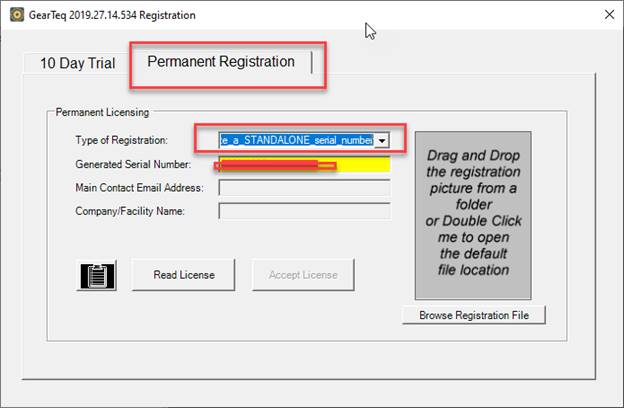
In the registration wizard, click on the Permanent Registration tab and select "Create a STANDALONE serial number" from the drop-down menu. Send us the generated serial number.
I’m running a
GearTrax, GearTeq or CamTrax64 SNL Facility License, SNL Global License,
NetHASP license or SneakerNET license. Can I install the registration file on a
server so all users can easily access it?
Yes, the registration file can be placed on a server and then all users can browse to that file. Each user can click the Browse Registration Button on the GearTrax, GearTeq or CamTrax64 registration screen to locate the file. After the file is located, click the Accept Registration button. At that point our software should be activated. If not, close the software and restart it.
Please note that the software itself needs to be installed on each computer, under each user’s login. HASP drivers (if applicable) need to be installed on each computer.
I followed the
registration instructions but when I click “Read License” and the text file
pops up, the “Accept License” button remains greyed out. What now?
If none of the boxes in the registration form are yellow, try restarting
GearTrax.
If any of the
boxes in the registration form are yellow, you may need a new registration
file. Please send us a screenshot of the registration window.
How can I move GearTrax, GearTeq or CamTrax64 to a new computer?
1. Download the software from our website or using the download links supplied at purchase.
2. You will need to either double click the .msi installation file and follow the registration wizard or double click the setup.exe file and then click Install.
3. Install your existing registration file following the registration instructions you were provided at purchase.
4. Uninstall GearTrax, GearTeq or CamTrax64 from the old computer.
Please note that if your GearTrax, GearTeq or CamTrax64 license is registered to a serial number created for the computer on which it installed, you will need to choose “Create a XXXSNL serial number” or “Create an ID for this computer” from the Type of Registration drop down menu on the Permanent tab of the registration screen and send us the generated serial number. We will then supply a new registration file.
Using the Software
General Questions
I have multiple
versions of SOLIDWORKS, Solid Edge or Autodesk Inventor installed. How can I
choose which version your software uses to generate parts?
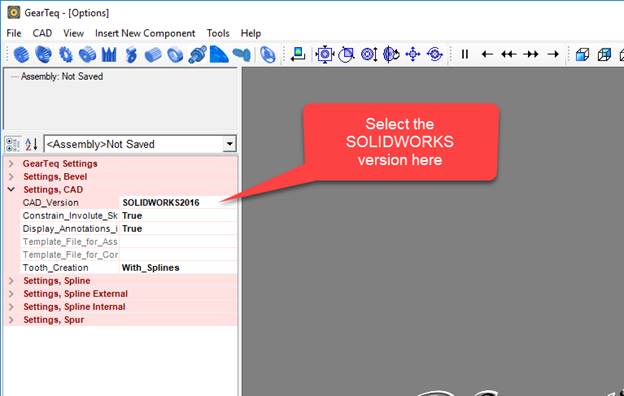
Users with multiple versions of SOLIDWORKS, Solid Edge or Autodesk Inventor installed can select which version they would like to use in the GearTrax, GearTeq or CamTrax64 options menu (tools>options menu).
Regarding our technical question, we sent you screen shots or GearTrax,
GearTeq or CamTrax64 files. Isn't that enough? Why do you need more
documentation, for example customer drawings or data sheets?
If you only send us GearTrax, GearTeq or CamTrax64 files, that tells us what you
are doing but not what you are trying to do. Sometimes we can pick things out
that you might find unnecessary or redundant and we might find it very useful. Plus,
redundancy helps verify the design parameters. We do not share any drawings
that are sent to us with anyone else.
When trying to export to SOLIDWORKS I’m getting an error message that begins, “Unhandled exception has occurred…”
First, try running the SOLIDWORKS Repair Utility. If that does not solve the issue, then try the following actions. Please try one at a time, in the order suggested.
1. Click Continue.
2. Restart the computer.
3. Install the latest SOLIDWORKS service packs.
4. Install the latest Windows service packs.
5. Reinstall our software
6.
Reinstall SOLIDWORKS
When attempting to open your software, I get an error message reading "Application cannot be started. Contact Application Vendor".
Please try uninstalling the software and reinstalling it from our website’s Software Downloads page. If that doesn’t solve the problem, please send the error log details to support@camnetics.com.
GearTrax Questions
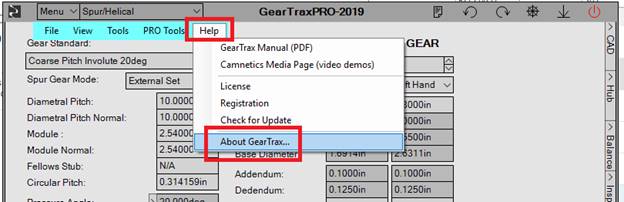
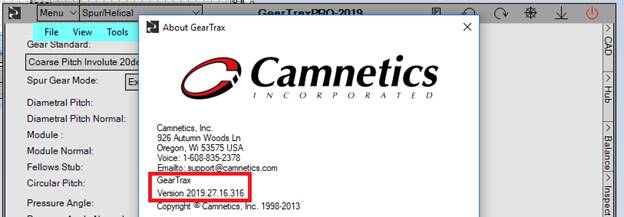
How do I see which build/version of GearTrax I’m running?
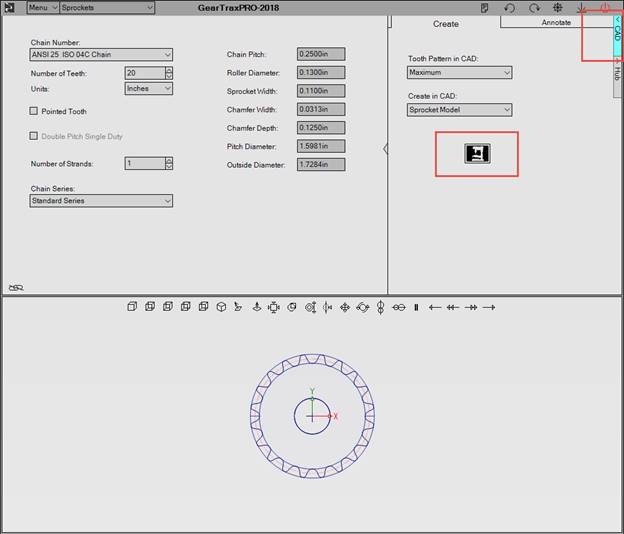
How do I create a part directly in SOLIDWORKS using GearTrax?
Click the CAD button, which is located along the right side of the GearTrax window. The CAD module will expand. Choose the options you would like and click the button to create directly in SOLIDWORKS.
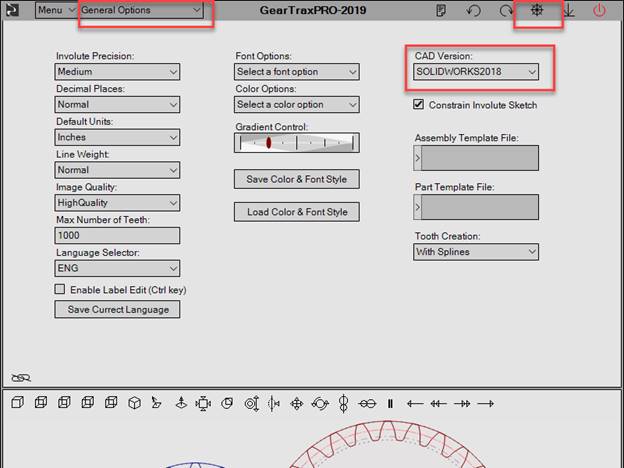
Is it possible to choose which version of SolidWorks (2018, 2019 etc.) GearTrax will use to make the 3D model of the gear?
Yes, in the General Options:
I’m having trouble exporting models. I’m running SOLIDWORKS 2016 and whenever I try to export the model from GearTrax, it defaults to CAMWorks. I change the setting to SOLIDWORKS 2016, exit and reopen GearTrax, and the default export program has changed back to CAMWorks.
In the GearTrax Help menu click on Registration. Then click the 10 Day Trial tab. If the Type of Registration listed is “Use the CAMWorks serial number”, please follow the steps below:
1. Close GearTrax.
2. Rename the registration bmp file. (This should be located in your Documents folder. You can simply add a 1 to the end.)
3. Restart GearTrax. Choose “Use SOLIDWORKS serial number” from the Type of Registration drop-down list.
4. Close GearTrax.
5. Restore the name of the registration bmp file.
6. Restart GearTrax.
Please contact us if this fails to correct the issue.
Can gears created in GearTrax be modified only in SOLIDWORKS? Is it impossible to modify gears in Solid Edge?
Correct, the gears in Solid Edge cannot be edited.
Can I use GearTrax with an online version of SOLIDWORKS?
Yes, starting with the 2020 version, GearTrax users running an online version of SOLIDWORKS can now register GearTrax to a serial number created for the computer on which they have GearTrax installed.
Install link: https://camnetics.com/pf.php
During the registration process, you will need to choose the “Create an ID to work with this computer” registration option. Please send us the generated serial number so that we can create your registration file.
How accurate are the gear models created by GearTrax?
The spur/helical gears are very accurate. The straight bevel gears are very accurate. The accuracy of the spiral bevel gears depend on the number of teeth. The Camnetics TruSpiral creates a more accurate tooth the than the standard spiral or Zerol options.
You should always check the gear teeth using the SOLIDWORKS interference detection at different gear meshes. You may need to slightly adjust the gear mate so there is a small amount of interference first and then check for a consistent interference at different rotations.
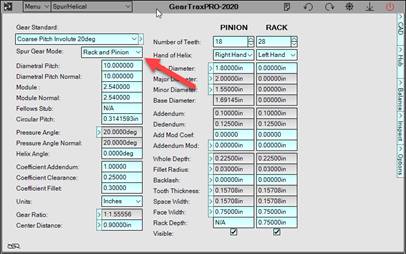
How do you create a gear rack in GearTrax?
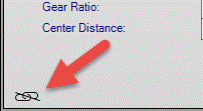
Can I resize the GearTrax window?
Yes, but only if you’re running GearTraxPRO. The Tether toggle button is in lower left corner of the data window. If it is un-tethered, the graphics window is not tethered to the data window and is then free to be relocated and resized.
GearTeq Questions
How do I uninstall GearTeq?
Open Windows Control Panel>Programs and Features>Uninstall/Change.
Can GearTeq model spiral bevel gears?
GearTeq does model spiral bevel gears but they should not be used for manufacturing.
Can GearTeq model hypoid gears?
GearTeq does not model hypoid gears.
Is there a method to mate a set of spur gears so that the involute surfaces are in contact?
Yes, see this PDF:
PreciseGearMating.pdf
Will GearTeq detect interference in an assembly?
No, it won't. We suggest using the SOLIDWORKS interference detection for this purpose.
CamTrax64 Questions
Will CamTrax64 run on a Win32 machine?
Newer versions of CamTrax64 require a Win64 operating system. CamTrax64-2018 and older are compiled to run on either Win32 or Win64 operating systems.
Do you have any recommendations for mating a cam follower to a barrel cam path surface?
First use the single surface option when creating the cam in CAD. Create a very narrow surface on the outside of the cam follower, about 0.010" wide. Mate the cam so it can spin freely on its axis. Mate the cam follower so it can move freely only in the direction of travel. Then add a tangent mate between the narrow cam follower surface and a surface on the cam path.
NetHASP Questions
I’m getting a message saying that GearTrax/GearTeq/CamTrax64 cannot locate the driver (drivernotfound).
You will get that message if a license is not available. Is anyone else using the software? If not, please contact us for further assistance.
I have a NetHASP for my GearTrax/GearTeq/CamTrax64. How can I know if someone else is currently accessing the software, and if so, who?
You can download and install the Aladdin Monitor from this page: https://sentinelcustomer.gemalto.com/sentineldownloads/?s=&c=End+User&p=HASP+HL&o=Windows&t=all&l=all
I am having trouble with a network license for GearTeq, GearTrax or CamTrax.
Please review send a detailed description of the problem to support@camnetics.com.